
Autopilot: schedule and content
Where to see topics, created content, each one's stage and publishing dates.
The Schedule shows the month: planned topics, ready content and the date each one goes live. Each piece shows on its day, with its stage and title.
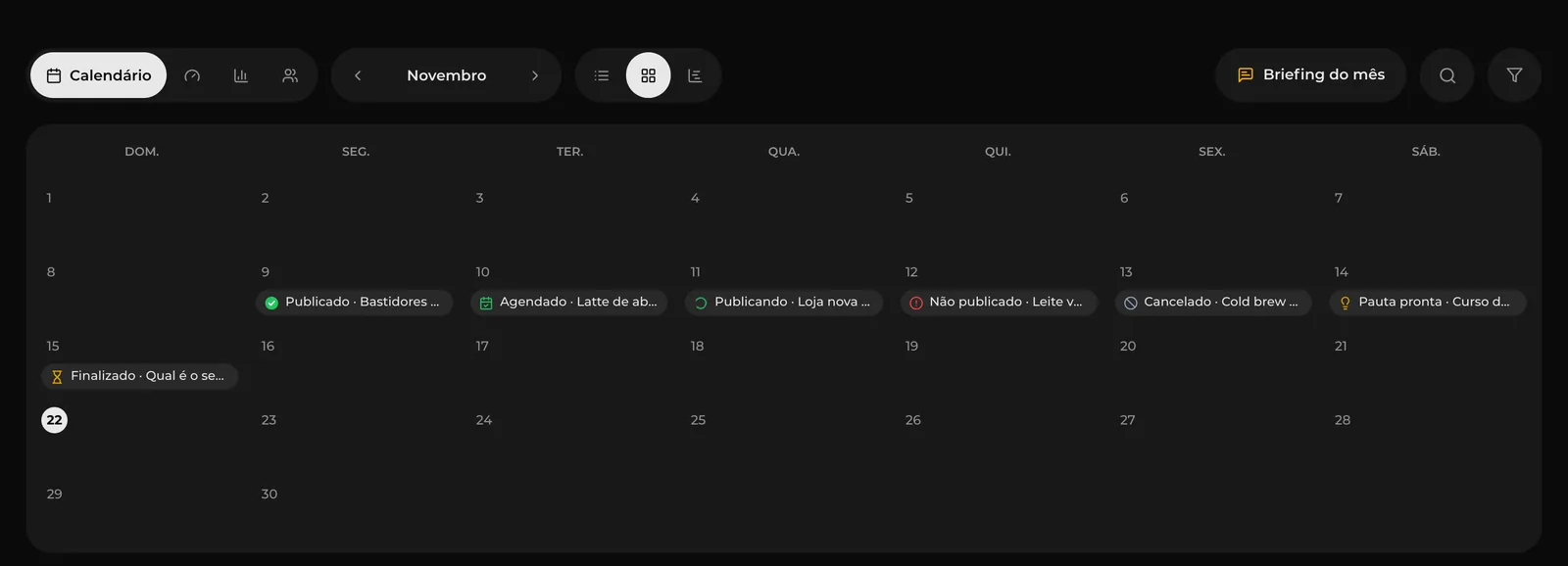
The stages
- Idea ready · awaiting approval: the idea is waiting for you (if you review topics).
- Producing: Autopilot is creating the piece.
- Content ready · awaiting approval: the piece is ready and waiting for you (if you review content).
- Scheduled: approved, it goes out on its own on the set date.
- Publishing and Published: it's already on the networks.
- Not published: the network refused it; open the piece to see why and try again.
- Cancelled: it won't go out.
At the top, the Monthly brief is where you tell what you want for the next cycle (see Materials and direction). The tabs next to Calendar show your networks' numbers (see Network Analytics).
What each plan includes per cycle
- Start: 1 network, 4 posts, 4 carousels, 4 stories and 4 videos up to 30 s; created with Formi's style library.
- Pro: up to 3 networks, 7 posts, 7 carousels, 12 stories with stickers and 6 videos, with up to 2 videos featuring your Avatar; some pieces can be custom-made.
- Premium: all networks, 9 posts, 9 carousels, 20 stories and 12 videos, with up to 4 videos featuring your Avatar.
Tap a piece to see it, its caption and date, and to approve or ask for a correction (see Approve, correct and publish).